Mv 902 2015-2026


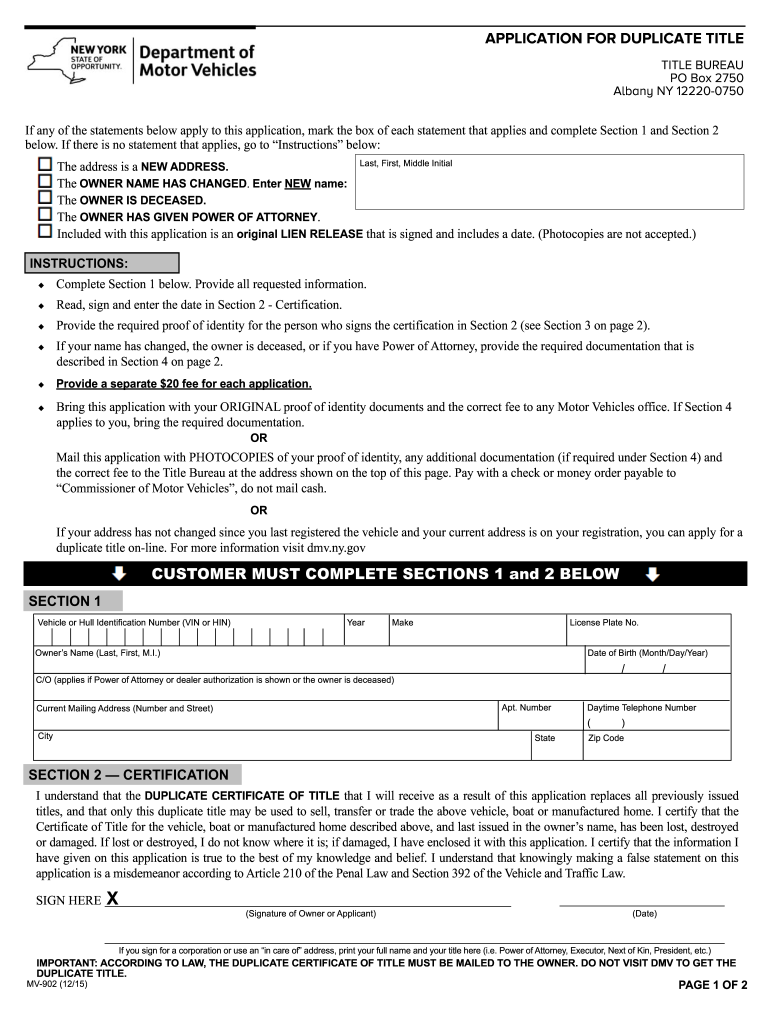
What is the MV-902?
The MV-902 is a form used in New York for requesting a duplicate title for a motor vehicle. This form is essential for individuals who have lost their original title or need to replace a damaged one. The MV-902 serves as an official request to the Department of Motor Vehicles (DMV) to issue a new title, ensuring that the vehicle's ownership is properly documented. Understanding the purpose of this form is crucial for anyone looking to maintain clear and legal ownership of their vehicle.
Steps to Complete the MV-902
Completing the MV-902 involves several key steps to ensure accuracy and compliance with state regulations:
- Gather necessary information about the vehicle, including the Vehicle Identification Number (VIN), make, model, and year.
- Provide personal information, such as your name, address, and contact details.
- Indicate the reason for requesting a duplicate title, whether it is lost, stolen, or damaged.
- Sign and date the form to validate your request.
- Submit the completed MV-902 to the DMV, either online, by mail, or in person, depending on your preference.
Legal Use of the MV-902
The MV-902 is legally recognized as a valid document for obtaining a duplicate title in New York. To ensure its legal standing, it must be filled out completely and accurately. When submitting the form, it is important to comply with all relevant state laws governing vehicle ownership and title transfers. This compliance helps prevent potential disputes regarding ownership and ensures that the new title is issued without complications.
Required Documents for the MV-902
When filling out the MV-902, you will need to provide specific documents to support your request. These may include:
- A valid form of identification, such as a driver's license or state ID.
- Proof of ownership, which can include a bill of sale or previous title documentation.
- Payment for any applicable fees associated with the duplicate title request.
Having these documents ready will streamline the process and help ensure that your request is processed efficiently.
Form Submission Methods
The MV-902 can be submitted to the DMV through various methods, allowing flexibility for applicants:
- Online: Many users prefer to complete the form digitally through the DMV's website, which can expedite the process.
- Mail: You can print the completed form and send it to the appropriate DMV address along with any required documents.
- In-Person: Visiting a local DMV office allows for immediate submission and any necessary assistance from staff.
State-Specific Rules for the MV-902
Each state may have its own regulations regarding the MV-902 form. In New York, it is essential to follow the specific guidelines set forth by the DMV. This includes understanding any fees associated with the duplicate title request and ensuring that all information provided is accurate. Familiarizing yourself with these state-specific rules will help avoid delays and ensure compliance with local laws.
Quick guide on how to complete application for duplicate title duplicate title application
Simplify your existence by filling out Mv 902 form with airSlate SignNow
Whether you need to title a new automobile, register for obtaining a driver’s license, transfer ownership, or accomplish any other task related to vehicles, dealing with such RMV paperwork as Mv 902 is a necessary burden.
There are various methods through which you can access them: by mail, at the RMV service center, or by downloading them online via your local RMV website and printing them. Each of these is time-consuming. If you’re seeking a quicker method to fill them out and sign them with a legally-binding signature, airSlate SignNow is the optimal choice.
How to complete Mv 902 with ease
- Click on Show details to view a brief overview of the document in which you are interested.
- Select Get document to initiate and open the document.
- Follow the green label indicating the mandatory fields if that pertains to you.
- Make use of the top toolbar and utilize our advanced feature set to modify, annotate, and enhance your document's professional appearance.
- Add text, your initials, shapes and images, and other elements.
- Choose Sign in in the same toolbar to generate a legally-binding signature.
- Review the document content to ensure it contains no mistakes and inconsistencies.
- Click on Done to complete the document.
Using our solution to finalize your Mv 902 and other similar papers will conserve you a considerable amount of time and hassle. Streamline your RMV document completion task from the very beginning!
Create this form in 5 minutes or less
FAQs
-
I want to start a business in India. What type of licenses and registrations are required for it?
A business name is simply a name or title under which a person, or other legal entity, trades. The Companies Act of 1956 sets down rules for the establishment of both public and private companies. The most commonly used corporate form is the limited company, unlimited companies being relatively uncommon. A company is formed by registering the Memorandum and Articles of Association with the State Registrar of Companies of the state in which the main office is to be located.Business Registration in IndiaThere are many business entitles are available in India For e.g. Private Limited Company, Public Limited Company, Unlimited Company, Partnership, Sole Proprietorship etc. The most commonly used corporate form is the limited company, unlimited companies being relatively uncommon. A company is formed by registering the Memorandum and Articles of Association with the State Registrar of Companies of the state in which the main office is to be located.The first step in the formation of a company is the approval of the name by the Registrar of Companies (ROC) in the State/Union Territory in which the company will maintain its Registered Office. This approval is provided subject to certain conditions: for instance, there should not be an existing company by the same name. Further, the last words in the name are required to be "Private Ltd." in the case of a private company and "Limited" in the case of a Public Company. The application should mention at least four suitable names of the proposed company, in order of preference. In the case of a private limited company, the name of the company should end with the words "Private Limited" as the last words. In case of a public limited company, the name of the company should end with the word "Limited" as the last word. The ROC generally informs the applicant within seven days from the date of submission of the application, whether or not any of the names applied for is available. Once a name is approved, it is valid for a period of six months, within which time Memorandum of Association and Articles of Association together with miscellaneous documents should be filed. If one is unable to do so, an application may be made for renewal of name by paying additional fees. After obtaining the name approval, it normally takes approximately two to three weeks to incorporate a company depending on where the company is registered.For any Legal and Accounting support, Happy to help you, let us talk at Wazzeer.com
-
Who do I make a check out to when paying for a duplicate title in California?
Not sure why you would pay for duplicate titles, but I guess this is up to you :)You can check uniqueness in Copyscape.com
Create this form in 5 minutes!
How to create an eSignature for the application for duplicate title duplicate title application
How to make an electronic signature for your Application For Duplicate Title Duplicate Title Application in the online mode
How to make an eSignature for your Application For Duplicate Title Duplicate Title Application in Google Chrome
How to generate an eSignature for signing the Application For Duplicate Title Duplicate Title Application in Gmail
How to create an eSignature for the Application For Duplicate Title Duplicate Title Application straight from your smartphone
How to generate an electronic signature for the Application For Duplicate Title Duplicate Title Application on iOS devices
How to generate an eSignature for the Application For Duplicate Title Duplicate Title Application on Android devices
People also ask
-
What is the Mv 902 feature in airSlate SignNow?
The Mv 902 feature in airSlate SignNow refers to a specific set of functionalities designed to enhance the electronic signing experience. It allows users to manage document workflows efficiently, ensuring that all signatures are captured securely and quickly. This feature is particularly beneficial for businesses looking to streamline their document processes.
-
How does Mv 902 improve document signing efficiency?
Mv 902 signNowly improves document signing efficiency by automating workflows and reducing manual tasks. With features like templates and bulk sending, users can easily send multiple documents for signature at once. This saves time and ensures a faster turnaround for contracts and agreements.
-
What are the pricing options for Mv 902 with airSlate SignNow?
airSlate SignNow offers flexible pricing options for the Mv 902 feature, catering to businesses of all sizes. Plans typically include monthly or annual subscriptions, with varying levels of access to advanced features like Mv 902. For detailed pricing, it's best to check the official airSlate SignNow website.
-
Can I integrate Mv 902 with other software?
Yes, Mv 902 can be integrated with various software platforms, enhancing your existing workflows. airSlate SignNow supports integrations with popular tools like Salesforce, Google Drive, and more. This allows businesses to leverage their current systems while utilizing the powerful features of Mv 902.
-
What are the key benefits of using Mv 902 in airSlate SignNow?
Using Mv 902 in airSlate SignNow provides key benefits such as improved security, faster document processing, and enhanced collaboration. It enables users to capture legally binding signatures effortlessly, which is crucial for businesses that rely on timely agreements. Additionally, the user-friendly interface makes it accessible for everyone.
-
Is Mv 902 compliant with legal standards?
Yes, Mv 902 is designed to meet various legal standards for electronic signatures, ensuring compliance with regulations such as ESIGN and UETA. This compliance is critical for businesses that require legally binding agreements. With Mv 902, you can confidently send and sign documents knowing they are legally protected.
-
How can Mv 902 help my business save costs?
Mv 902 helps businesses save costs by reducing the need for paper, printing, and postage associated with traditional signing methods. By digitizing the signing process, companies can signNowly lower operational costs and improve overall efficiency. Additionally, the time saved in document processing can translate to increased productivity.
Get more for Mv 902
Find out other Mv 902
- Electronic signature Wisconsin Charity Lease Agreement Mobile
- Can I Electronic signature Wisconsin Charity Lease Agreement
- Electronic signature Utah Business Operations LLC Operating Agreement Later
- How To Electronic signature Michigan Construction Cease And Desist Letter
- Electronic signature Wisconsin Business Operations LLC Operating Agreement Myself
- Electronic signature Colorado Doctors Emergency Contact Form Secure
- How Do I Electronic signature Georgia Doctors Purchase Order Template
- Electronic signature Doctors PDF Louisiana Now
- How To Electronic signature Massachusetts Doctors Quitclaim Deed
- Electronic signature Minnesota Doctors Last Will And Testament Later
- How Do I Electronic signature Oregon Construction Business Plan Template
- How Do I Electronic signature Oregon Construction Living Will
- Electronic signature New York Doctors Permission Slip Free
- Electronic signature South Dakota Construction Quitclaim Deed Easy
- Electronic signature Texas Construction Claim Safe
- Electronic signature Texas Construction Promissory Note Template Online
- How To Electronic signature Oregon Doctors Stock Certificate
- How To Electronic signature Pennsylvania Doctors Quitclaim Deed
- Electronic signature Utah Construction LLC Operating Agreement Computer
- Electronic signature Doctors Word South Dakota Safe